Tuesday, August 26, 2014

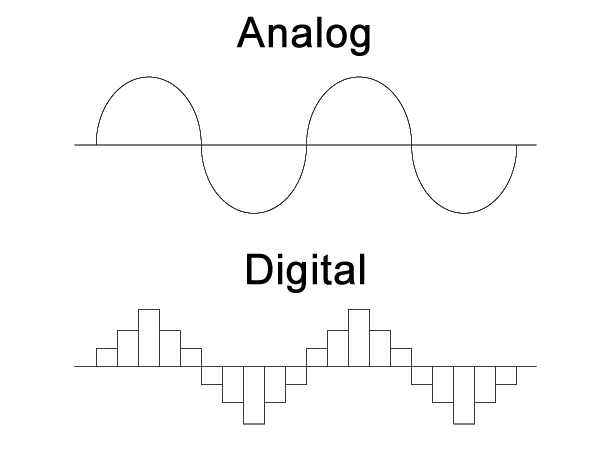
Digital vs. Analog

What's the difference between digital and analog recording? Check out the following questions from HowStuffWorks to formulate an answer:
If you still can't understand the difference between digital and analog audio, read this well-written article for beginners from Blaze Audio: What is Digital Audio?

Finally, if you are the kind of person who really wants to geek out on the topic, check out Columbia University's online course: Music and Computers, Chapter 2: The Digital Representation of Sound,
Part Two: Playing by the Numbers, Section 2.2: Analog Versus Digital.

Still want to learn more about the difference between analog and digital?  Even thought the following video uses the example of electricity, it still shows the difference between analog and digital signals.


Now that you think you've got an answer, write your first blog article, with the following parameters:
  1. Explain, in your own words, the difference between digital and analog music.
  2. Insert a LucidChart venn diagram to illustrate your point.
  3. Link one website for further information.

Monday, May 19, 2014

Monday, April 14, 2014

Glory Be To Jesus - A MIDI Hymn Project

Here's an example of the MIDI Hymn Project you are about to embark upon:


The procedure for making a MIDI hymn is (simply) as follows:
  1. Set the key of Garageband to match the key of your hymn (see red annotations in second screen shot). Input the four voices of the hymn Glory Be to Jesus (soprano, alto, tenor, bass) into separate tracks in Garageband. 
    First four tracks in Garageband
  2. Tracks must be green (software instruments) to enter MIDI information in Garageband. Notes can either be clicked into regions by first command-clicking (hold down the Command key while clicking with your mouse) in an empty track, then command-clicking onto the staff in score view as shown below:
    Adding MIDI notes to a track
  3. After entering the SATB tracks, then it's time to start researching the ranges of orchestral instruments and their families (woodwind, brass, and string) to see which instruments can play in the ranges of the soprano, alto, tenor, and bass voices.  A good source for finding the ranges of orchestral instruments is Wikipedia.
    Wikipedia: Trumpet range
  4. We've been using Apple's Jam Pack 4: Symphony Orchestra (manual) to get high quality samples of real orchestral instruments in Garageband '11 (6.0.5) in our Music Tech lab. When you double-click on a track header (or click the "i" button in the lower right corner of your screen) you'll be presented with the instrument panel.  Choose "Jam Pack Symphony Orchestra" from the dropdown menu, select the instrument family you need (Horns = Brass) and select the orchestral instrument that can has the same range as that voice of the hymn.
    Selecting Orchestral Instruments in Garageband '11(6.0.5)
    5. Make new tracks for each new instrument you add to your project.  Option-drag (hold down the Option key while dragging) a soprano region into a soprano instrument's track (such as Flute).  Some instruments sound more natural when played in a high or lower range.  You can adjust the octave that an instrument plays in with the pitch slider in the the track editor.  +12 = an octave higher (up 12 half steps).  -12 = an octave lower (down 12 half steps).  Bass instruments sound good an octave lower than written, but just make such the range of the instrument can handle it!  Sometimes an entire instrument family can play an octave higher than written.  Sometimes it works well to have one instrument playing at pitch (+/- 0) which it's doubled either an octave up (+12) or down (-12).  Listen carefully and go for the most natural sound of each instrument you choose.

Tuesday, March 18, 2014

Final Commercial Project

Now that you've finished one commercial project, replacing the soundtrack of an existing commercial with new music, it's time to go wild and choose your own commercial to replace the soundtrack.  Look for a commercial that is has a mainly music soundtrack, but listen for other ambient sounds to keep, like we kept the sound of the man typing on his computer, clicking the iPod wheel, door slamming, and narrator's voice.

Looking for ideas?  Nathan Birkholz did an excellent job not only of replacing the original music from this Evian water commercial, but he also added sound effects of rollerskates, grinding on a metal rail, chain link fence, and babies laughing. Watch the original commercial first, then watch Nathan's "Baby Nathan" version:

Original Evian water commercial:

Nathan's "Baby Nathan" version:


Check out these student's commercials as well for more ideas: Nathan Delelandre, Bethany Westphal, Josh Meyer, Mykenna Schneiter

After you've found a commercial to work with, you'll need to download it from YouTube.  We've been using KeepVid successfully for many years, but it needs Java to run and it might not work correctly if you are using a Chrome browser.  Watch the top of the screen for a yellow bar and click on "Allow Java to run on this site".  When prompted with a dialogue box, click a checkmark in "Allow".  Then watch for a list of files in blue with the extension .MP4.  If you are working on an older iMac, choose the 480p file.  If you are working on a newer iMac, choose 720p or 1080p.

If you are trying to use KeepVid.com on a new Mac running OS X 10.9 Mavericks, use Safari instead of Chrome.

Watch this screencast to see how to use Keepvid.com to download YouTube videos using Chrome:


Choose a new commercial to replace its soundtrack with new music. Propose your commercial, replacement music, and other sound effects (foley work, voice overs, etc.) to Mr. Witte.

If you need music at a specific number of beats per minute to match the action in your commercial, use one of the following websites to calculate beats per minute (BPM) of the original soundtrack
Want to take your replacement soundtrack to the next level? Start listening for other sound effects in your original commercial which happen during the music which you are replacing.  To make your commercial soundtrack believeable, you will want to find new sound effects online and download them into your Garageband project.  See the student's work above for screenshots of soundeffects in Garageband.  

Can't find the perfect sound effect online?  Maybe it's time to get into a little foley work.  Watch this video to understand the role of foley work in films:
Friday, March 7, 2014

Commercial Project - First Steps

Block 3: Please click through this presentation and the links inside to understand the first steps of the Commercial Project.

Wednesday, March 5, 2014

Commercial Soundtrack Replacement - A History

The culminating project for digital audio manipulation has been the replacement of an existing commercial's soundtrack with music of a student's choosing.  I've written about this project a number of times over the years:

11/1/13 - Commercial Soundtrack Replacement
10/2/12 - Commercial Soundtracks
1/19/11 - Dance Project Lessons (scroll down to 5. Commercial Project 1)
9/18/09 - Saving a YouTube Video